How to split tips in a tip pool
- Enter the total tips for the shift, cash and card together.
- Add any tip-outs that come off the top, such as 10% to the bar.
- List everyone in the pool with the hours they worked, and role points if some roles share differently.
- Read each person's share and tips per hour, then print the tip sheet for signatures or download it as Excel.
Three common ways to split tips
By hours worked is the most common and the easiest to explain: everyone earns the same tips for each hour on the floor. Someone who closes after a long double gets more than someone who left early.
By hours and role points keeps the hours but weights roles. Servers might be 1 point, bartenders 0.8, bussers and hosts 0.5. Agree on the points before the shift so nobody is surprised.
Tip-outs give a set percent to a role first, such as the bar or the kitchen, and the rest is pooled. Many restaurants combine a tip-out with an hours-based pool, which is what this calculator does.
A worked example
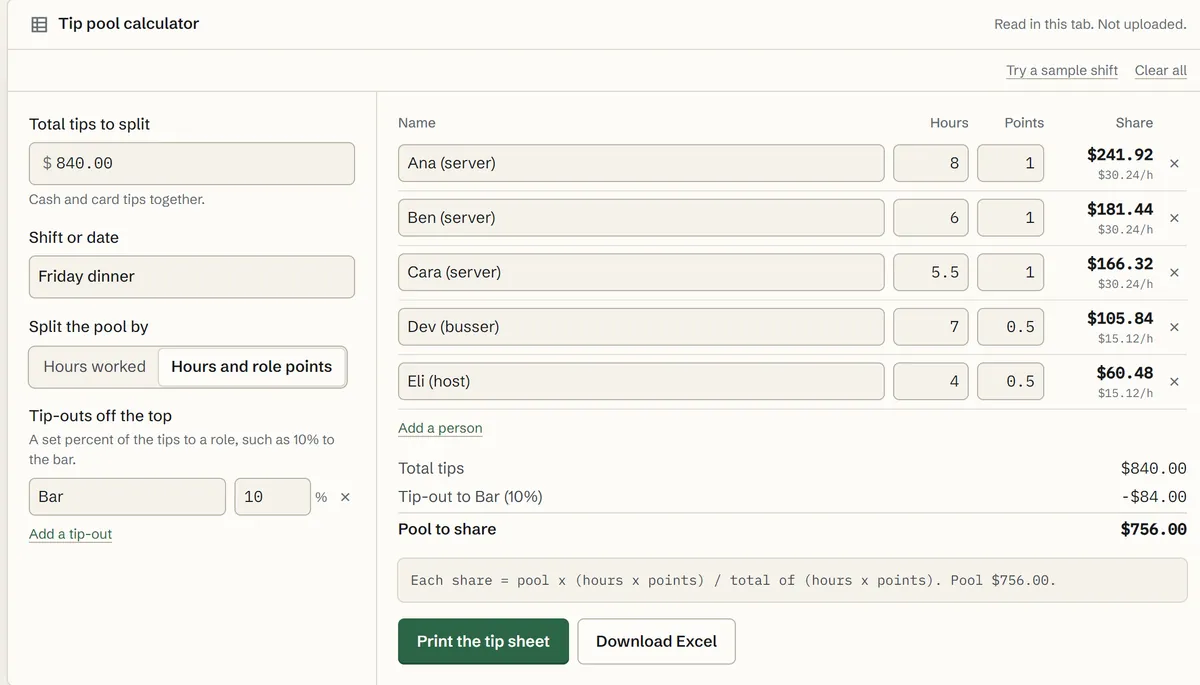
A Friday dinner shift brought in $840.00 in tips. The bar gets 10% off the top, $84.00, leaving a $756.00 pool. Servers count 1 point an hour, the busser and host 0.5:
tip sheet friday.xlsx
| Row | A | B | C | D |
|---|---|---|---|---|
| 1 | Name | Hours | Points | Share |
| 2 | Ana (server) | 8 | 1 | $241.92 |
| 3 | Ben (server) | 6 | 1 | $181.44 |
| 4 | Cara (server) | 5.5 | 1 | $166.32 |
| 5 | Dev (busser) | 7 | 0.5 | $105.84 |
| 6 | Eli (host) | 4 | 0.5 | $60.48 |
The shares add up to exactly $756.00. When a split doesn't divide evenly, the calculator rounds each share down to the cent and hands the leftover cents to the people with the largest remainders, so the total never drifts a penny. Open Try a sample shift to see it.
Tip pooling rules under federal law
The Fair Labor Standards Act lets employers require tip pooling (see the Department of Labor's Fact Sheet #15), and it doesn't limit the percent each employee contributes to a valid pool. It does limit who can receive from it. Employers may not keep employees' tips, and managers and supervisors may not keep tips or take money from the pool.
When an employer takes a tip credit, paying tipped employees less than the minimum wage in cash, the pool can include only employees who customarily and regularly receive tips, such as servers, bussers and service bartenders. When everyone is paid at least the full federal minimum wage in cash, the pool can also include cooks and dishwashers. States can set stricter rules, so check yours. This calculator does the arithmetic; it isn't legal advice.
End-of-shift situations
- Someone left early or came in late. Enter the hours they actually worked; splitting by hours handles it without any special rule.
- Two separate pools, such as lunch and dinner with different teams. Run the calculator once for each pool, since each has its own tips and its own hours.
- Paying out cash. The shares are exact to the cent. If you pay tips in cash, you may want to round to the dollar and carry the difference; if tips go through payroll, use the exact amounts.
- Changing the points. Agree on role points in advance and keep them the same from shift to shift, so everyone can check their own share.
Tip sheets and records
Print the tip sheet at the end of the shift: it lists the total, the tip-outs, each person's hours and share, and a column for signatures. Keeping signed sheets makes questions about a split easy to answer later. Download Excel saves the same sheet as a spreadsheet, so a week of shifts can sit in one tip pool spreadsheet for payroll. The team is saved on this device, so tomorrow you only change the hours. To total the hours themselves, use the time card calculator, and plan the week's shifts with the employee schedule template. At tax time, the no tax on tips calculator works out how much of a year's tips can be deducted.