How to print labels from Excel
- Open your address list: an Excel file (.xlsx or .xls), a CSV file or a Google Sheets download, with one address per row and column names such as Name, Address, City, State and ZIP in the first row.
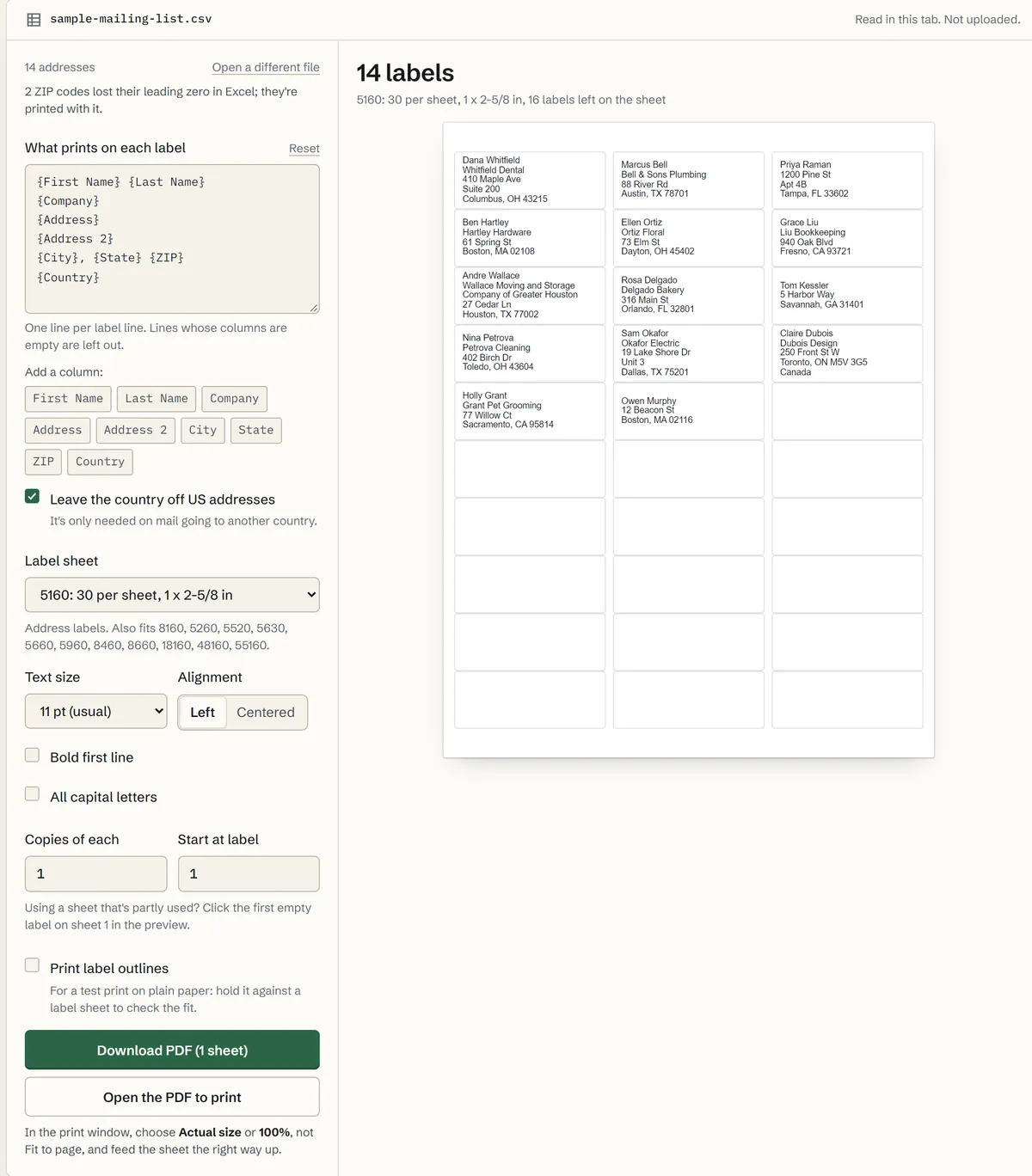
- Check What prints on each label. The usual layout is filled in from your column names; edit it like text, or click a column name to add it.
- Pick the label sheet, such as 5160 for 30 address labels to a sheet. The preview shows every sheet exactly as it will print.
- Download the PDF and print it on the label sheets at Actual size or 100%.
Labels from Google Sheets, Numbers or a typed list
From Google Sheets, select the cells including the column names row, copy, choose Paste or type addresses and paste. Cells copied from Excel, Numbers or LibreOffice paste the same way. You can also download the sheet as a CSV file and open that.
With no spreadsheet at all, type the addresses straight into the box with a blank line between them. That is also the quickest way to print a sheet of your own return address.
Addresses saved in your phone's contacts? Export them as a .vcf file and turn it into a spreadsheet with the VCF to CSV converter, then open that here.
A worked example
A mailing list with first and last names in separate columns, a second address line for suites, and ZIP codes for Boston that Excel stored as numbers:
mailing list.xlsx
| Row | A | B | C | D | E | F | G | H |
|---|---|---|---|---|---|---|---|---|
| 1 | First Name | Last Name | Company | Address | Address 2 | City | State | ZIP |
| 2 | Dana | Whitfield | Whitfield Dental | 410 Maple Ave | Suite 200 | Columbus | OH | 43215 |
| 4 | Priya | Raman | 1200 Pine St | Apt 4B | Tampa | FL | 33602 | |
| 5 | Ben | Hartley | Hartley Hardware | 61 Spring St | Boston | MA | 2108 |
The labels come out as “Dana Whitfield, Whitfield Dental, 410 Maple Ave, Suite 200, Columbus, OH 43215” on five lines. Priya Raman's label has no company line and Ben Hartley's has no suite line, because empty lines are left out rather than printed blank. Ben's ZIP code prints as 02108: in a ZIP column, US codes that lost their leading zero get it back. The sample list has 14 addresses, which fill 14 of the 30 labels on one 5160 sheet; the next mailing can start at label 15 of the same sheet.
Label sizes
The sizes below are built in, with margins from Avery's published specifications. Other numbers with the same layout print the same way: 8160 is the 5160 layout, for example. For any other sheet, choose Another size and enter the measurements from the pack.
| Sheet | Per sheet | Label size | Same layout |
|---|---|---|---|
| 5160Address labels | 30 | 1 x 2-5/8 inSame layout: 8160, 5260, 5520, 5630, 5660, 5960, 8460, 8660, 18160, 48160, 55160 | 8160, 5260, 5520, 5630, 5660, 5960, 8460, 8660, 18160, 48160, 55160 |
| 5161Address labels | 20 | 1 x 4 inSame layout: 8161, 5261, 5961, 8461 | 8161, 5261, 5961, 8461 |
| 5162Address labels | 14 | 1-1/3 x 4 inSame layout: 8162, 5262, 5522, 5962, 8462, 18262 | 8162, 5262, 5522, 5962, 8462, 18262 |
| 5163Shipping labels | 10 | 2 x 4 inSame layout: 8163, 5263, 5523, 5963, 8463, 18163, 48163 | 8163, 5263, 5523, 5963, 8463, 18163, 48163 |
| 5164Shipping labels | 6 | 3-1/3 x 4 inSame layout: 8164, 5264, 5524, 8254, 8464 | 8164, 5264, 5524, 8254, 8464 |
| 5167Return address labels | 80 | 1/2 x 1-3/4 inSame layout: 8167, 5267, 5667, 5967, 8667 | 8167, 5267, 5667, 5967, 8667 |
| 5195Return address labels | 60 | 2/3 x 1-3/4 inSame layout: 8195, 5155, 18195 | 8195, 5155, 18195 |
Avery and its product numbers are trademarks of their owner. SmallBizDesk isn't connected with Avery; the numbers only say which sheets these layouts fit.
Christmas card address labels
Open your card list, choose 5160 (or 8160 for an inkjet printer) and print the whole list as one PDF, a sheet of 30 at a time. For return address labels, type one address and fill the sheet with copies; 5167 and 5195 are the small return address sizes. Print one page on plain paper first and hold it against a label sheet to check the line-up.
If the labels don't line up
When text sits a little off every label, and more so toward the bottom of the sheet, the sheet was scaled to fit the page. In the print window choose Actual size or 100% and Letter paper. The PDF already asks for actual size, but some programs ignore that.
To check the fit without spending a label sheet, tick Print label outlines, print on plain paper and hold it against a label sheet up to a window. If every label is off by the same small amount, your printer feeds slightly off center: the outlines show by how much. Use labels made for your kind of printer, laser or inkjet; the pack says which.
Long names and addresses are printed a little smaller so they fit, and wrapped onto a second line if that isn't enough. The preview marks any address still too long for its label, so you can shorten it before printing.
Compared with a Word mail merge
Word's mail merge does the same job in more steps: start a labels document, pick the label product, connect the spreadsheet, insert the address block, update all labels, then finish the merge. Here the list opens, the labels appear, and the result is a PDF that prints the same on any computer, with no Word needed.
Before a big mailing, it's worth cleaning the list. Remove duplicate rows so nobody gets two envelopes, or merge several lists into one first.