How to use the time card calculator
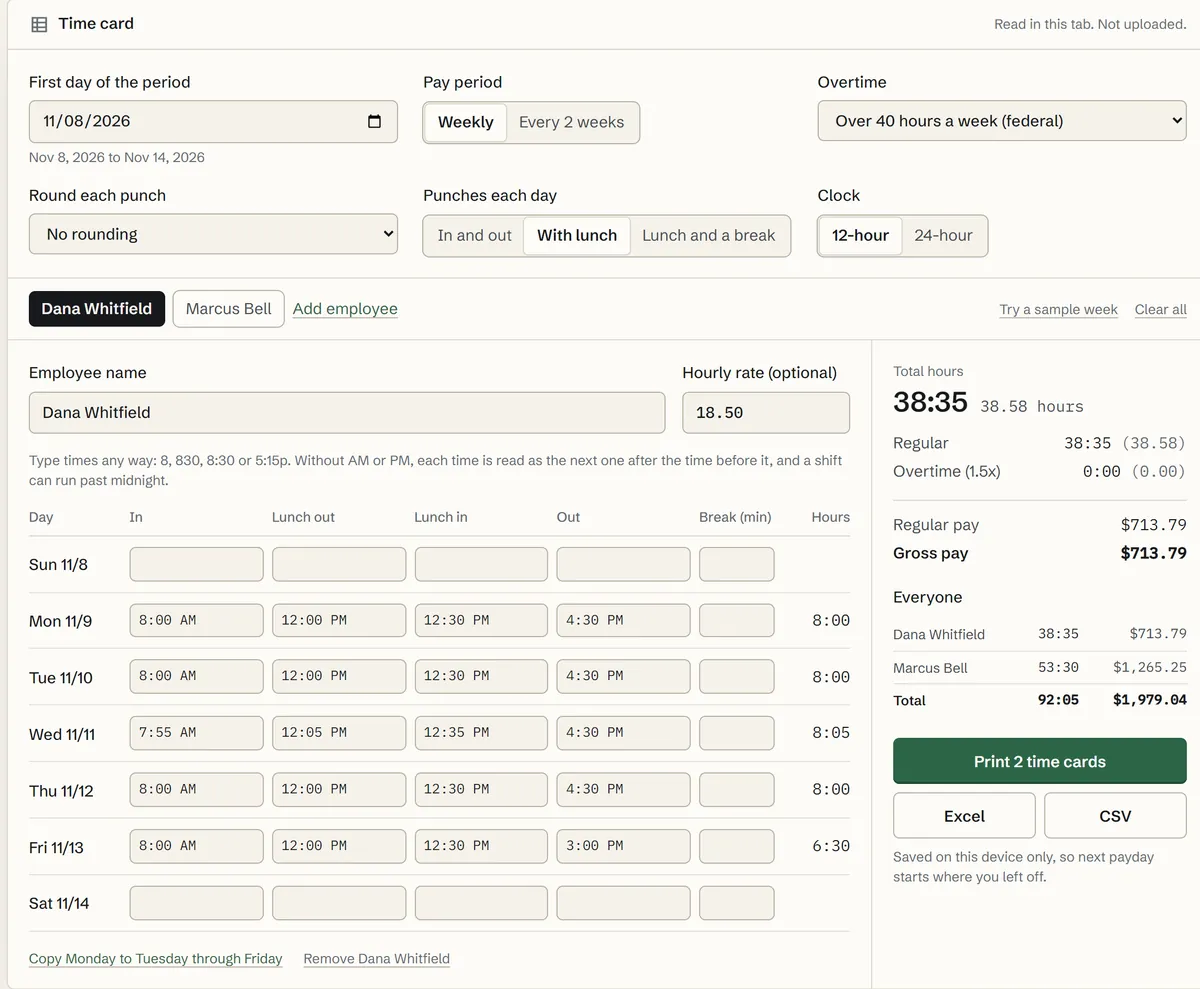
- Pick the first day of the pay period and whether pay is weekly or every 2 weeks.
- Type each day's clock-in, lunch-out, lunch-in and clock-out times. Typing
8,830or5:15pall work; each time is tidied into a full time when you move on. - Add an hourly rate to see regular pay, overtime pay and gross pay.
- Add more employees with Add employee, then print the time cards or download them as Excel or CSV.
How to calculate time card hours by hand
The calculator does this for you, but it helps to know the method when you check a card or explain one to an employee:
- Change afternoon times to 24-hour time by adding 12 to the hour: 4:30 PM becomes 16:30. Subtraction is much easier that way.
- Subtract the start time from the end time for each stretch of work: 16:30 minus 12:30 is 4:00.
- Add the stretches together and take off any unpaid break.
- Add up the days, then turn the minutes into decimal hours by dividing them by 60.
Common conversions: 6 minutes is 0.1 hours, 15 minutes is 0.25, 30 minutes is 0.5 and 45 minutes is 0.75. Payroll systems usually want decimal hours; employees usually read hours and minutes. The calculator shows both.
Minutes to decimal hours chart for payroll
Payroll wants decimal hours: divide the minutes by 60. 45 minutes is 0.75 of an hour, so 7 hours 45 minutes is 7.75 hours. To add hours and minutes, add the hours and the minutes separately, turn each 60 minutes into an hour, then convert what's left: 7:45 plus 8:30 is 15 hours 75 minutes, which is 16:15, or 16.25 hours. Every minute from 1 to 60, rounded to two decimals:
| Minutes | Hours |
|---|---|
| 1 | 0.02 |
| 2 | 0.03 |
| 3 | 0.05 |
| 4 | 0.07 |
| 5 | 0.08 |
| 6 | 0.10 |
| 7 | 0.12 |
| 8 | 0.13 |
| 9 | 0.15 |
| 10 | 0.17 |
| 11 | 0.18 |
| 12 | 0.20 |
| 13 | 0.22 |
| 14 | 0.23 |
| 15 | 0.25 |
| Minutes | Hours |
|---|---|
| 16 | 0.27 |
| 17 | 0.28 |
| 18 | 0.30 |
| 19 | 0.32 |
| 20 | 0.33 |
| 21 | 0.35 |
| 22 | 0.37 |
| 23 | 0.38 |
| 24 | 0.40 |
| 25 | 0.42 |
| 26 | 0.43 |
| 27 | 0.45 |
| 28 | 0.47 |
| 29 | 0.48 |
| 30 | 0.50 |
| Minutes | Hours |
|---|---|
| 31 | 0.52 |
| 32 | 0.53 |
| 33 | 0.55 |
| 34 | 0.57 |
| 35 | 0.58 |
| 36 | 0.60 |
| 37 | 0.62 |
| 38 | 0.63 |
| 39 | 0.65 |
| 40 | 0.67 |
| 41 | 0.68 |
| 42 | 0.70 |
| 43 | 0.72 |
| 44 | 0.73 |
| 45 | 0.75 |
| Minutes | Hours |
|---|---|
| 46 | 0.77 |
| 47 | 0.78 |
| 48 | 0.80 |
| 49 | 0.82 |
| 50 | 0.83 |
| 51 | 0.85 |
| 52 | 0.87 |
| 53 | 0.88 |
| 54 | 0.90 |
| 55 | 0.92 |
| 56 | 0.93 |
| 57 | 0.95 |
| 58 | 0.97 |
| 59 | 0.98 |
| 60 | 1.00 |
Military time chart for time cards
Time clocks often print 24-hour, or military, time. Choose 24-hour in the calculator and type times like 0730 or 1730 as they are. To convert by hand, add 12 to every hour from 1 PM on: 4:30 PM is 16:30. Midnight is 00:00 and noon is 12:00.
| 12-hour | 24-hour | 12-hour | 24-hour |
|---|---|---|---|
| 12:00 AM | 00:00 | 12:00 PM | 12:00 |
| 1:00 AM | 01:00 | 1:00 PM | 13:00 |
| 2:00 AM | 02:00 | 2:00 PM | 14:00 |
| 3:00 AM | 03:00 | 3:00 PM | 15:00 |
| 4:00 AM | 04:00 | 4:00 PM | 16:00 |
| 5:00 AM | 05:00 | 5:00 PM | 17:00 |
| 6:00 AM | 06:00 | 6:00 PM | 18:00 |
| 7:00 AM | 07:00 | 7:00 PM | 19:00 |
| 8:00 AM | 08:00 | 8:00 PM | 20:00 |
| 9:00 AM | 09:00 | 9:00 PM | 21:00 |
| 10:00 AM | 10:00 | 10:00 PM | 22:00 |
| 11:00 AM | 11:00 | 11:00 PM | 23:00 |
Hours worked with a lunch break: 30, 45 and 60 minute chart
Take the unpaid lunch off the time from clock-in to clock-out. A 9 to 5 day with a 30 minute lunch is 7 hours 30 minutes of work; with a 1 hour lunch it's 7 hours. The chart shows common shifts in hours and minutes, with decimal hours for payroll in brackets:
| Shift | 30 minute lunch | 45 minute lunch | 1 hour lunch |
|---|---|---|---|
| 9:00 AM to 3:00 PM | 5:30 (5.50) | 5:15 (5.25) | 5:00 (5.00) |
| 9:00 AM to 5:00 PM | 7:30 (7.50) | 7:15 (7.25) | 7:00 (7.00) |
| 8:00 AM to 4:30 PM | 8:00 (8.00) | 7:45 (7.75) | 7:30 (7.50) |
| 8:00 AM to 5:00 PM | 8:30 (8.50) | 8:15 (8.25) | 8:00 (8.00) |
| 7:00 AM to 5:30 PM | 10:00 (10.00) | 9:45 (9.75) | 9:30 (9.50) |
| 7:00 AM to 7:00 PM | 11:30 (11.50) | 11:15 (11.25) | 11:00 (11.00) |
Paid and unpaid breaks
Under federal rules, short breaks of about 5 to 20 minutes are paid work time (29 CFR 785.18). A meal period, usually 30 minutes or more, is unpaid only when the employee is completely relieved from duty (29 CFR 785.19): someone who has to eat at the desk and keep answering the phone is working, and that lunch is paid. Federal law doesn't require lunch or coffee breaks at all, but some states do.
Lunch break laws by state
These states require a meal break for adult workers in private jobs, according to the U.S. Department of Labor's table of state meal period laws (last revised January 1, 2023). The rules are shortened here, and most have exceptions, some by industry or employer size, so check with your state labor office before you rely on one.
| State | Meal break required |
|---|---|
| California | 30 minutes when the workday is over 5 hours (can be waived on a day of 6 hours or less), and a second 30 minutes over 10 hours. |
| Colorado | 30 minutes when a shift is over 5 consecutive hours. |
| Connecticut | 30 minutes for 7.5 consecutive hours or more, after the first 2 hours and before the last 2. |
| Delaware | 30 minutes for 7.5 consecutive hours or more, after the first 2 hours and before the last 2. |
| Illinois | 20 minutes for 7.5 continuous hours or more, no later than 5 hours into the shift. |
| Kentucky | A reasonable off-duty period, usually 30 minutes, between the 3rd and 5th hour. |
| Maine | 30 minutes after 6 consecutive hours. |
| Maryland | Retail businesses with 50 or more employees: 15 minutes for 4 to 6 hours, 30 minutes for more than 6 hours. |
| Massachusetts | 30 minutes for each 6 hours worked. |
| Minnesota | Enough unpaid time to eat a meal, for 8 consecutive hours or more. |
| Nebraska | 30 minutes off the premises in each 8-hour shift. |
| Nevada | 30 minutes for 8 continuous hours. |
| New Hampshire | 30 minutes after 5 consecutive hours, unless the employee can eat while working and the employer allows it. |
| New York | 30 minutes over the noon meal for shifts over 6 hours (1 hour in factories), with more for long and night shifts. |
| North Dakota | 30 minutes on shifts over 5 hours, if the employee wants it. |
| Oregon | 30 minutes for a work period of 6 to 8 hours, at a time set by the length of the shift. |
| Rhode Island | 20 minutes in a 6-hour shift, 30 minutes in an 8-hour shift. |
| Tennessee | 30 minutes for 6 consecutive hours or more, not in the first hour. |
| Vermont | Reasonable chances to eat during the workday, with no set length. |
| Washington | 30 minutes for more than 5 hours, between the 2nd and 5th hour of the shift. |
| West Virginia | 20 minutes for 6 hours or more. |
Guam and Puerto Rico have meal break rules too. Seven states, California, Colorado, Kentucky, Minnesota, Nevada, Oregon and Washington, also require rest breaks, which count as time worked.
Lunch and another break on the same day
Choose Lunch and a break under Punches each day for a third pair of in and out times, so a split shift or a clocked afternoon break adds up correctly. When breaks aren't clocked, type the unpaid minutes in Unpaid break instead.
A worked example
Dana works Monday to Friday with a 30-minute lunch. On Wednesday she clocked in at 7:55 and took a slightly later lunch, and on Friday she left at 3:00.
time cards.xlsx
| Row | A | B | C | D | E | F |
|---|---|---|---|---|---|---|
| 1 | Day | In | Lunch out | Lunch in | Out | Hours |
| 2 | Mon | 8:00 AM | 12:00 PM | 12:30 PM | 4:30 PM | 8:00 |
| 3 | Tue | 8:00 AM | 12:00 PM | 12:30 PM | 4:30 PM | 8:00 |
| 4 | Wed | 7:55 AM | 12:05 PM | 12:35 PM | 4:30 PM | 8:05 |
| 5 | Thu | 8:00 AM | 12:00 PM | 12:30 PM | 4:30 PM | 8:00 |
| 6 | Fri | 8:00 AM | 12:00 PM | 12:30 PM | 3:00 PM | 6:30 |
Wednesday is 4 hours 10 minutes before lunch and 3 hours 55 minutes after, so 8:05. At $18.50 an hour, 38.58 hours comes to $713.79 gross. A coworker on the same card who worked 53 hours 30 minutes at $21.00 gets 40 regular hours and 13.5 overtime hours at $31.50, which is $1,265.25. Try the sample week in the calculator to see both cards.
Overtime: weekly, every two weeks, and California
Under the federal rule, hourly employees earn time and a half for hours over 40 in a workweek. A workweek is a fixed, repeating 7-day period, so a two-week pay period is two separate workweeks: hours can't be averaged across them. The calculator works out each week on its own and shows both.
California adds daily rules: time and a half after 8 hours in a day, double time after 12, and on the seventh day in a row in one workweek, time and a half for the first 8 hours and double time after that. Choose California: daily and weekly to apply them. A few other states have daily overtime rules of their own; the overtime laws by state table lists every state's rules. To see how much of a year's overtime counts for the federal deduction, use the no tax on overtime calculator.
Time clock rounding rules and the 7-minute rule
Many employers round each clock-in and clock-out to the nearest 5 minutes, tenth of an hour (6 minutes) or quarter hour (15 minutes). The US Department of Labor allows this as long as it averages out over time and doesn't short employees for time they actually worked (29 CFR 785.48). Choose a rounding step and every punch is rounded before the hours are added; leave it at No rounding to pay exact minutes.
The “7-minute rule” is the common name for rounding to the nearest quarter hour: 1 to 7 minutes past a quarter rounds down, and 8 to 14 minutes rounds up, so 8:07 counts as 8:00 and 8:08 as 8:15. Some states are stricter about rounding, so check your state's rules too.
Add this calculator to your website
Running a payroll blog, an accounting firm's site or an HR resource page? You can put the full calculator on your own page for free. Paste this code where it should appear:
<iframe src="https://smallbizdesk.com/embed/time-card-calculator/" title="Time card calculator" width="100%" height="1400" style="border:0;max-width:100%" loading="lazy"></iframe>
<p style="font-size:14px">Time card calculator by <a href="https://smallbizdesk.com/time-card-calculator/">SmallBizDesk</a></p>
<script>window.addEventListener("message",function(e){if(e.origin!=="https://smallbizdesk.com"||!e.data||e.data.type!=="smallbizdesk-height")return;document.querySelectorAll("iframe").forEach(function(f){if(f.contentWindow===e.source)f.style.height=e.data.height+"px";});});</script>
The calculator runs inside your page exactly as it does here: nothing your visitors type is uploaded, and there are no ads in it. Keep the credit line under it so people know where it comes from.
Printing, Excel and keeping records
Print makes one time card per employee, each on its own page, with lines for the employee and supervisor to sign. Excel gives a summary sheet plus one sheet per person; CSV gives one row per employee per day, ready for a payroll import. To combine several pay periods into one file later, merge the CSV files. To set the year's paydays and pay periods, use the payroll calendar.
Federal rules ask employers to keep time cards for at least two years (29 CFR 516.6). This calculator is a tool for adding up hours, not legal or payroll advice; check the totals before you pay, and check your state's rules if you're unsure what applies.