How to use the schedule template
- Pick the week, then start from a template or add each person, with their role and, if you like, their hourly rate.
- Type each shift in the day's box:
9-5,7:30a-3:30p,10p-6a, oroffandPTO. Shifts you've already used are suggested as you type. - Check the hours for each person and each day, and the warnings for overtime and short rest.
- Print the schedule, save it as a PDF, or download Excel or CSV. Next week, copy this week's shifts and adjust.
Free employee schedule templates
Choose one under Start from a template, above the grid, then change the names and shifts to your own. Hours, overtime and rest between shifts are worked out for each one as soon as it loads.
- Restaurant or cafe: openers, a lunch rush and closers, seven days a week, with a 30 minute unpaid break on shifts over 6 hours.
- Retail store: open 9 a.m. to 9 p.m. Monday to Saturday and 10 to 6 on Sunday, with opening and closing shifts and part-time help in the evenings.
- Office, 9 to 5: Monday to Friday with a 30 minute lunch, and a part-time assistant three mornings a week.
- 24/7, three 8-hour shifts: days, evenings and nights on weekdays, and a weekend crew for the same three shifts, so every hour of the week is covered.
- 12-hour shifts, 2-2-3 (Pitman): four crews, two on days and two on nights. Each crew works 60 hours one week and 24 the next, so the schedule flags 20 hours over 40 in the long week: under federal law, overtime is counted for each workweek, not averaged over the two. In week two, crews A and B swap patterns, and so do C and D.
A template loads into the week you're on. Next week, Copy last week's shifts carries it forward.
How to make a work schedule that works
- Start from coverage. Write down when you're open and how many people each part of the day needs: opening, the lunch rush, closing.
- Collect availability and requests off before you start, so the first draft is close to the final one.
- Fill the busiest shifts first with your most experienced people, then build out the rest.
- Check the totals. Look for anyone over 40 hours, anyone closing and then opening the next morning, and days that are over or under staffed. The row of daily totals shows how many people work each day and from when to when.
- Post it early where everyone can see it, and keep a copy. A schedule posted well ahead means fewer swaps and no-shows.
A worked example
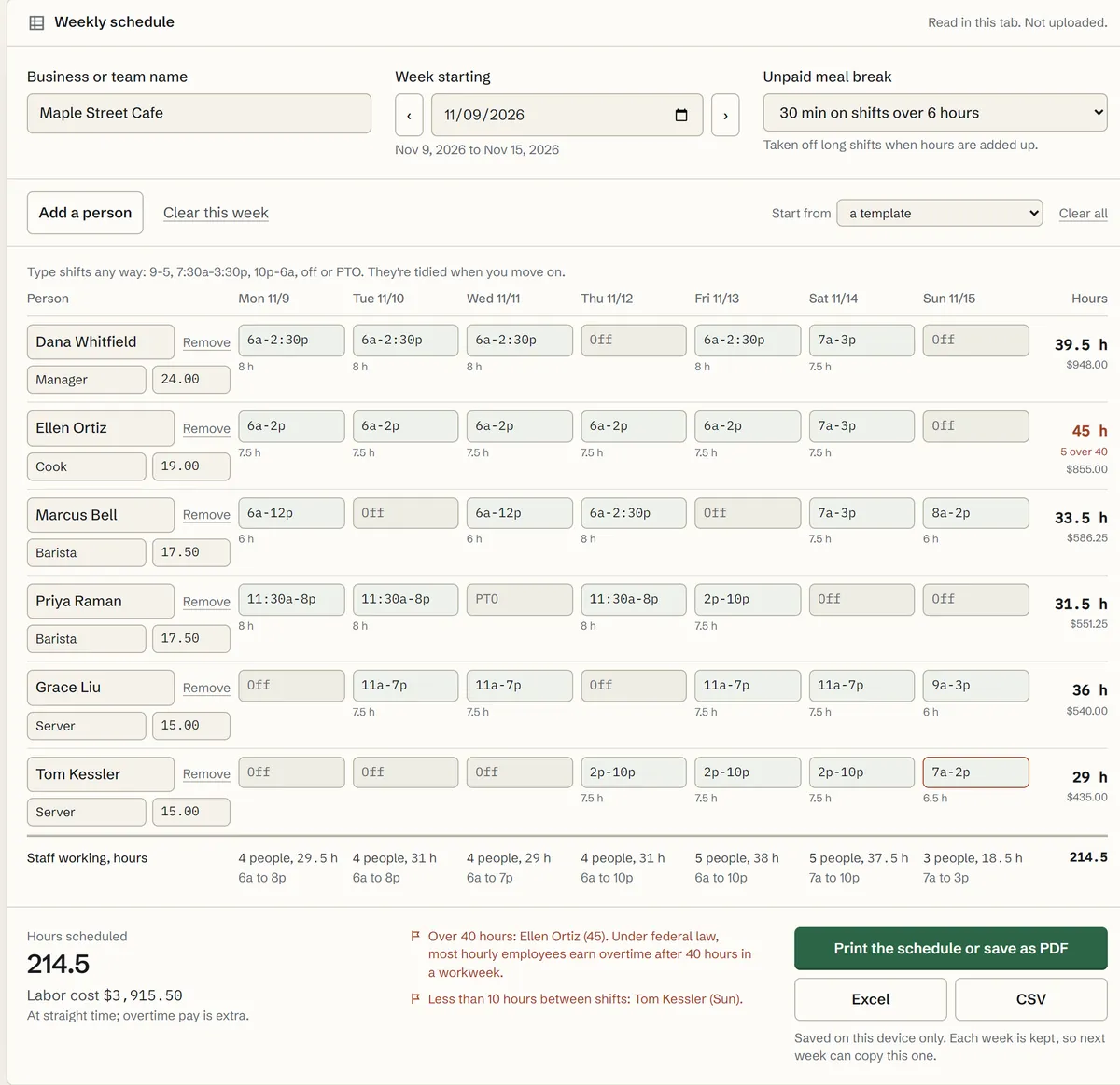
A small cafe with six people, a 30 minute unpaid break on shifts over 6 hours, and hourly rates filled in:
schedule week of 10-12.xlsx
| Row | A | B | C | D | E | F | G |
|---|---|---|---|---|---|---|---|
| 1 | Name | Mon | Tue | Fri | Sat | Sun | Hours |
| 4 | Dana (Manager) | 6a-2:30p | 6a-2:30p | 6a-2:30p | 7a-3p | Off | 39.5 |
| 5 | Ellen (Cook) | 6a-2p | 6a-2p | 6a-2p | 7a-3p | Off | 45 |
| 9 | Tom (Server) | Off | Off | 2p-10p | 2p-10p | 7a-2p | 29 |
The week comes to 214.5 hours and $3,915.50 of labor at straight time. Two things get flagged. Ellen is scheduled for 45 hours, 5 over 40, which means overtime pay for those hours. Tom closes Saturday at 10 PM and opens Sunday at 7 AM, only 9 hours later. Moving his Sunday start to 8 AM fixes the second, and giving one of Ellen's shifts to Marcus fixes the first. Choose Restaurant or cafe under Start from a template to see every shift. To see what an hourly rate comes to over a year, use the hourly to salary calculator.
Overtime, breaks and rest between shifts
Under federal law, most hourly employees earn time and a half for hours over 40 in a workweek, so the schedule shows each person's weekly total and flags anyone over 40. Several states add daily overtime; the overtime laws by state table lists them. After the week is worked, the time card calculator adds up the actual hours and overtime pay.
Federal law doesn't require lunch or coffee breaks. When breaks are given, short ones of about 5 to 20 minutes are paid work time, and meal periods of at least 30 minutes are not, which is what the unpaid break setting takes off. Some states require meal or rest breaks of their own.
A few states and cities have predictive scheduling laws for larger employers. Oregon's, for example, requires schedules in writing 14 days ahead and 10 hours of rest between shifts unless the worker agrees. The 10 hour check here helps anywhere, since a short turnaround is hard on anyone. This is a scheduling tool, not legal advice; check the rules for your state and city.
Printing, Excel and keeping past weeks
Print gives one landscape page with everyone's shifts, hours and a row of daily staff counts, ready for the break room; choose Save as PDF in the print window to text or email it. Excel keeps the same layout with totals, and CSV has one row per shift with start, end and paid hours. Each week is saved on this device, so you can go back to any past week, and next week can start as a copy of this one.